Web Design prompt
Admin Dashboard UI Layout Spec Prompt
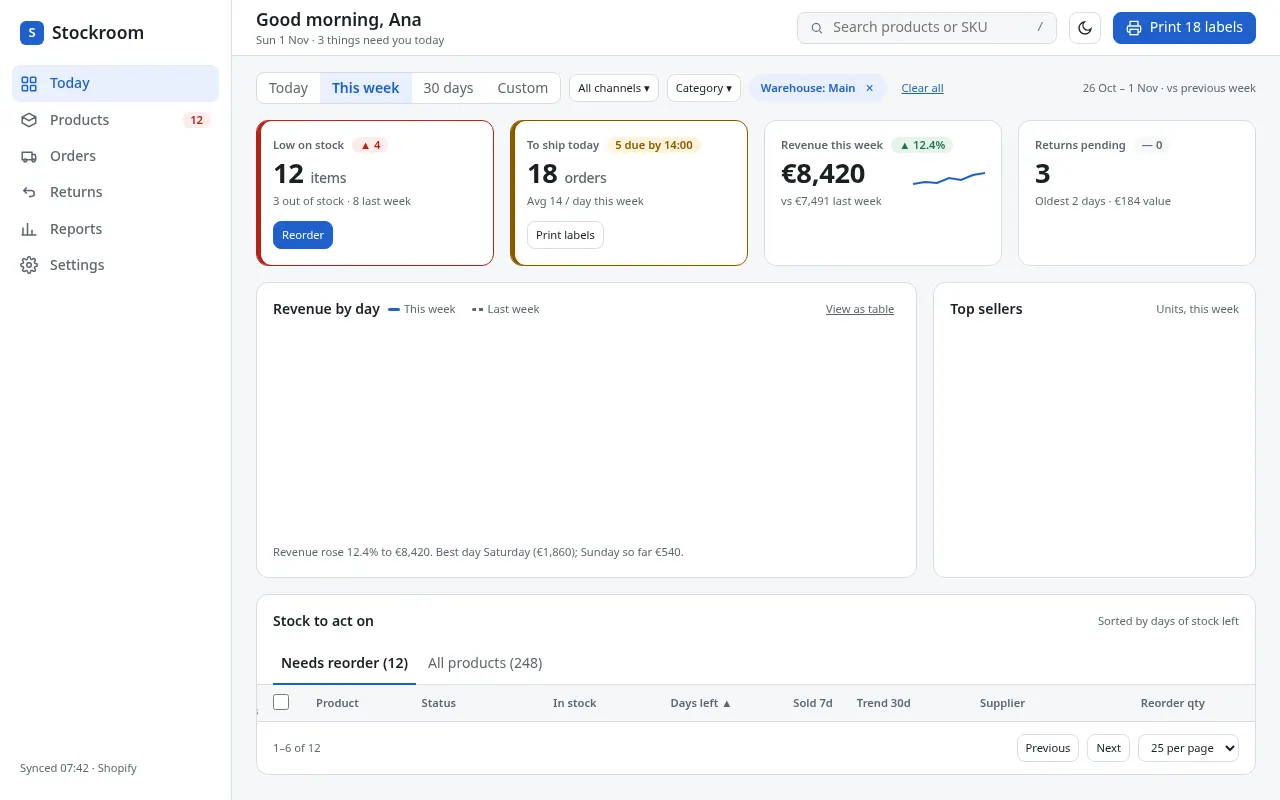
Design a data-heavy dashboard screen with clear hierarchy: layout grid, KPI cards, charts, tables, filters, empty and error states.
The prompt
You are a senior UX designer specialising in data-dense B2B interfaces. Design the main dashboard for {{product_type}}.

Primary user: {{main_user}}.
Numbers they need at a glance: {{key_metrics}}.
Tasks they start from here: {{main_tasks}}.
Theme: {{theme}}.

Provide:
1. Information hierarchy: rank everything on the screen by importance and explain the ranking in one line each.
2. Layout: app shell (sidebar or top nav, with widths), content grid (columns, gutter, breakpoints at 1440, 1024, 768 and 390px) and what collapses or moves at each breakpoint.
3. KPI cards: content of each card (label, value, comparison, trend), number formatting rules, and when a card turns into a warning state.
4. Charts: pick the chart type for each metric that needs one and justify it. Specify axis labels, gridlines, tooltip content and a colour-blind-safe series palette (hex values).
5. Table: columns, default sort, row actions, bulk actions, pagination vs infinite scroll, and the mobile pattern.
6. Filters and date range: placement, defaults and how active filters are shown.
7. States: first-run empty state, loading skeleton, partial data, error with retry, and no permission.
8. Visual tokens: colours for background, surface, border, text, muted text, accent, success, warning, danger (hex, with contrast ratios for text pairs, minimum 4.5:1), type scale (1.25 ratio from 14px for data UIs), 4/8pt spacing and radii.
9. Accessibility: keyboard order, table semantics, chart alternatives (data table or summary text), focus styles.

Keep labels short and use sentence case. Variables
| Variable | What to put | Example |
|---|---|---|
{{product_type}} | Type of product | Inventory management for small online shops |
{{main_user}} | Who uses the dashboard daily | Shop owner checking stock each morning |
{{key_metrics}} | Four to six numbers they need at a glance | Items low on stock, orders to ship today, revenue this week, returns pending |
{{main_tasks}} | The top tasks they do from this screen | Reorder stock, print shipping labels, check a product's sales |
{{theme}} | Light, dark or both | Both, light by default |
Tips
- Use a 14px base for dense dashboards and a 16px base for marketing pages; say which you want.
- Ask for "realistic sample data for every table and chart" to make mock-ups convincing without real customer data.
- Follow up with "Write this as a React component using only semantic HTML and CSS variables" to get a starting build.
Related prompts
- SaaS Landing Page Design Spec PromptGet a complete, buildable landing page design for a software product: sections, copy, palette, type scale, spacing and component states in one answer.
- Design System Tokens from a Brand BriefTurn a short brand description into a full set of design tokens (colour, type, spacing, radius, shadow, motion) as JSON and CSS custom properties.
- Brand Identity Starter Kit PromptGet a compact brand identity for a new business: positioning, three logo concepts, palette, type pairing, voice and example applications.
- Portfolio Website Art Direction PromptPlan a personal portfolio site that shows your best work first, with layout, case-study structure, type and colour chosen for your discipline.