Motion & Animation prompt
Loading, Skeleton & Progress States
Design honest loading feedback for every wait length: instant, short, long and unknown, with skeletons, progress and timeouts.
The prompt
Act as a product designer focused on perceived performance. Design the loading experience for: {{screen}}.

Typical wait: {{typical_wait}}.
Build with: {{tech_stack}}.

Define behaviour by wait length:
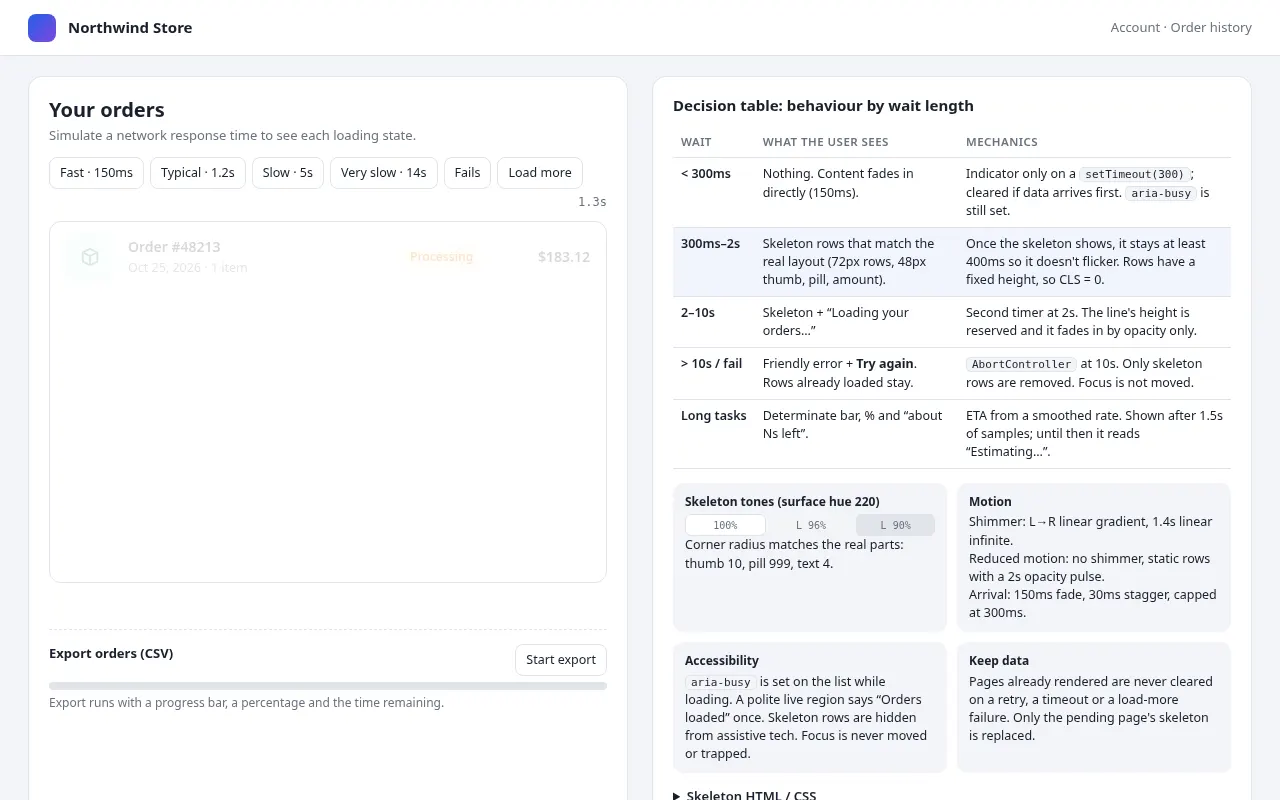
- Under 300ms: show nothing (avoid flashes). Explain how to delay the indicator.
- 300ms–2s: skeleton screen matching the real layout (same heights, so no layout shift when content arrives).
- 2–10s: skeleton plus a short status line ("Loading your orders…").
- Over 10s or failure: friendly error with a retry button, and keep any data already loaded.
- Unknown length tasks (uploads, exports): determinate progress bar with percentage and time remaining when possible.

Visual and motion spec:
- Skeleton colours from the page's surface colour (two tones with about 6% lightness difference), radius matching real components.
- Shimmer: a linear gradient moving left to right, 1.4s linear infinite; under prefers-reduced-motion, a static skeleton with a gentle 2s opacity pulse or nothing.
- Content arrival: fade in 150ms; stagger list rows 30ms, max 300ms total.
- Accessibility: aria-busy on the container while loading; a polite live region announcing "Orders loaded" once; never trap focus.

Output: a decision table, the HTML/CSS for the skeleton, and JS for the delayed-indicator and timeout logic. Variables
| Variable | What to put | Example |
|---|---|---|
{{screen}} | The screen that loads data | Order history list in an online shop account |
{{typical_wait}} | How long loading usually takes | 300ms–2s, sometimes 10s on slow networks |
{{tech_stack}} | How it will be built | CSS and vanilla JavaScript |
Tips
- Match skeleton shapes to the real content; generic grey bars feel slower than a blank screen.
- Log real load times before choosing thresholds; your numbers may differ from the defaults here.
Related prompts
- Logo Reveal Animation BriefPlan a 2–4 second logo animation with frame-accurate timing, easing and sound cues, ready for After Effects, Lottie or CSS.
- UI Motion System SpecDefine a consistent motion language for a product: duration and easing tokens, choreography rules, and patterns for common transitions.
- Scroll-driven Storytelling SectionCreate a scroll-triggered sequence that reveals a product story step by step using CSS scroll-driven animations with a JavaScript fallback.
- Accessible Multi-step Form FlowDesign and build a multi-step form with validation, progress, save-and-resume and error handling that works for keyboard and screen-reader users.