Interaction prompt
Accessible Multi-step Form Flow
Design and build a multi-step form with validation, progress, save-and-resume and error handling that works for keyboard and screen-reader users.
The prompt
Act as a UX engineer who specialises in accessible forms. Design and implement a multi-step form for {{form_purpose}}.

Steps and fields: {{steps}}.
Build with: {{tech_stack}}.

UX requirements:
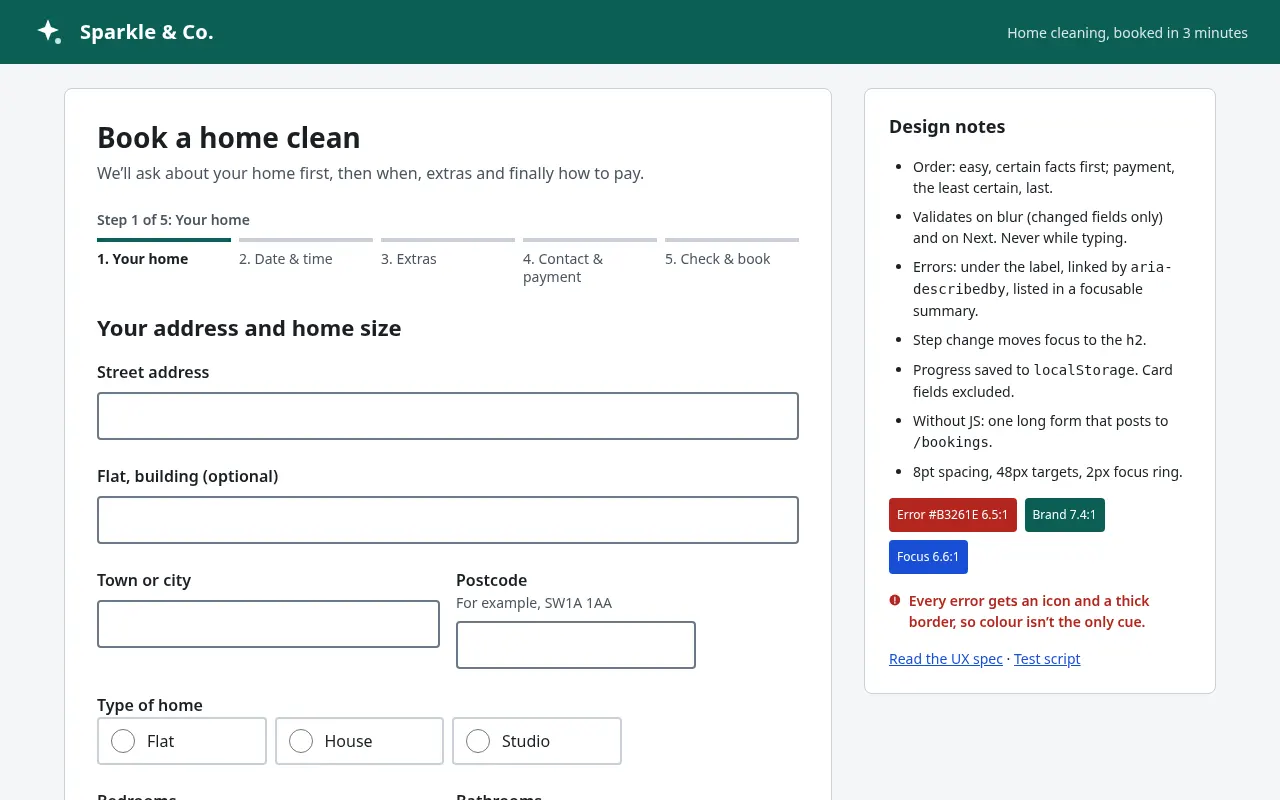
1. Progress indicator showing step names and "Step X of Y", marked up as an ordered list with aria-current="step".
2. One topic per step; the most uncertain questions last. Show a summary step before submit with "Edit" links back to each step.
3. Validation: validate on blur and on "Next", never on every keystroke. Error messages are specific ("Enter a postcode like SW1A 1AA"), appear under the field, are linked with aria-describedby, and an error summary at the top of the step lists all errors as links that move focus to the field.
4. Focus management: when a step changes, move focus to the step heading. Back and Next buttons are real buttons; Back never loses entered data.
5. Save and resume: store progress in localStorage (no personal payment data) and offer "Continue where you left off" on return.
6. Input details: correct type, inputmode and autocomplete attributes for every field; labels always visible (no placeholder-only labels); 44px minimum touch targets.
7. Works without JavaScript as a single long form that submits normally.

Visual spec: spacing on an 8pt grid, error colour with at least 4.5:1 contrast and an icon so colour is not the only signal, focus ring 2px.

Output: the step-by-step UX spec, then complete code, then a test script covering keyboard-only, screen reader (VoiceOver/NVDA) and mobile. Variables
| Variable | What to put | Example |
|---|---|---|
{{form_purpose}} | What the form is for | Booking a home cleaning service |
{{steps}} | The steps and fields in each | 1. Address and home size; 2. Date and time; 3. Extras; 4. Contact details and payment |
{{tech_stack}} | How it will be built | HTML, CSS and vanilla JavaScript |
Tips
- Ask only for what you need; every removed field raises completion rates.
- Run the finished form with a screen reader yourself; automated checkers miss focus-order problems.
Related prompts
- Button States & Micro-interactions SpecSpecify every state of a button set (primary, secondary, ghost, destructive) with exact colours, timings, focus rings and loading behaviour.
- Command Palette (⌘K) Search UIBuild a keyboard-first command palette with fuzzy search, grouped results, recent items and full accessibility using the combobox pattern.
- Drag-and-drop Kanban Board InteractionSpecify and build a kanban board where cards can be moved by mouse, touch and keyboard, with clear drop feedback and undo.
- Loading, Skeleton & Progress StatesDesign honest loading feedback for every wait length: instant, short, long and unknown, with skeletons, progress and timeouts.