Interaction prompt
Button States & Micro-interactions Spec
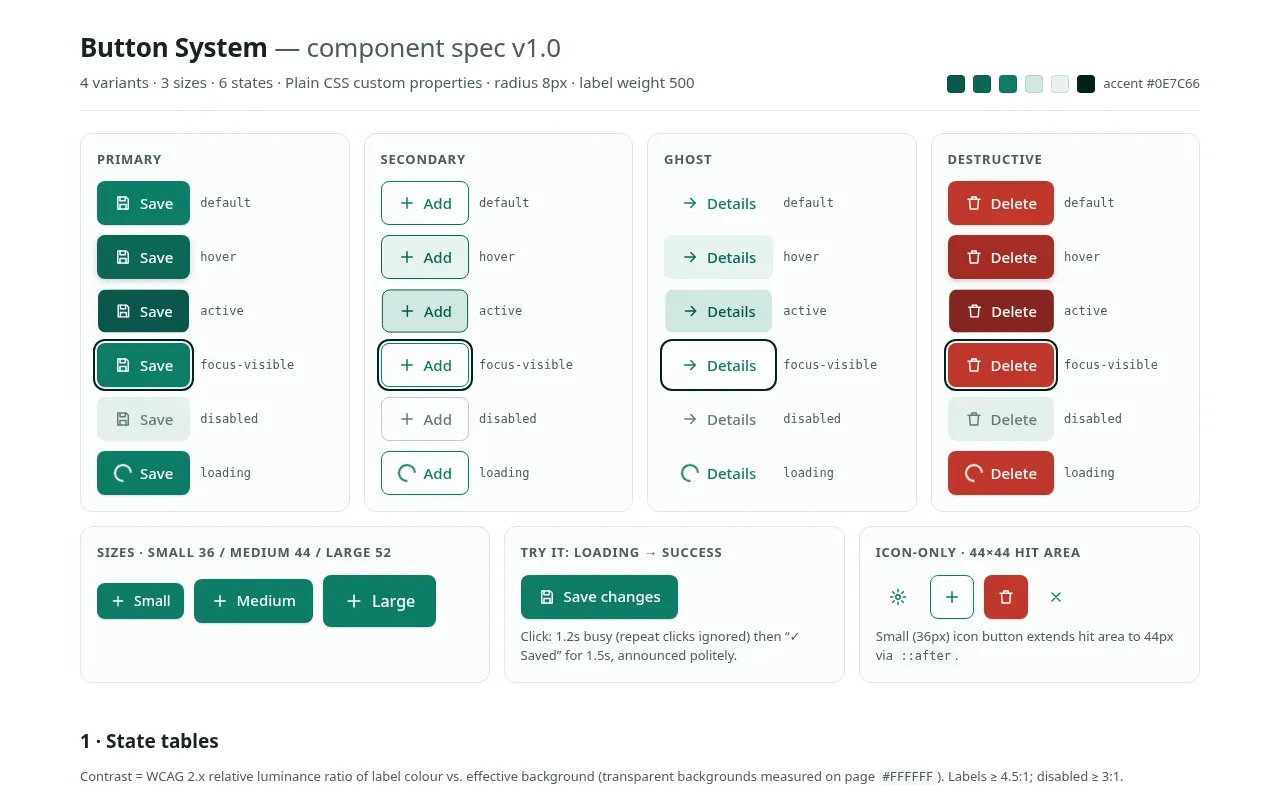
Specify every state of a button set (primary, secondary, ghost, destructive) with exact colours, timings, focus rings and loading behaviour.
The prompt
You are an interaction designer writing a component spec for engineers. Specify a button system.

Accent colour: {{brand_accent}}.
Shape and size: {{button_shape}}.
Implementation: {{framework}}.

Variants: primary, secondary (outlined), ghost (text-only), destructive. Sizes: small (36px), medium (44px), large (52px).

For each variant, give a table of states — default, hover, active/pressed, focus-visible, disabled, loading — with: background, text colour, border, shadow, transform, cursor. Use hex values derived from {{brand_accent}} and give the text/background contrast ratio for each state (minimum 4.5:1 for labels; disabled may drop but must stay readable at 3:1).

Micro-interactions:
- Hover: duration and easing (e.g. 120ms cubic-bezier(0.2, 0, 0, 1)).
- Press: scale(0.98) or translateY(1px), 80ms, released at 140ms.
- Focus-visible: 2px ring with 2px offset in a colour that passes 3:1 against both the button and the page.
- Loading: spinner replaces the icon, not the label; width stays fixed; aria-busy="true"; button stays focusable but ignores repeat clicks.
- Success confirmation (optional): label briefly changes to a checkmark + "Saved" for 1.5s, announced via an aria-live region.

Also cover: icon-only buttons (aria-label, 44×44px minimum hit area), button vs link usage rules, and prefers-reduced-motion (remove transforms, keep colour changes).

Output: the state tables, then production-ready {{framework}} code, then a QA checklist of 8 items. Variables
| Variable | What to put | Example |
|---|---|---|
{{brand_accent}} | Primary accent colour as hex | #0E7C66 |
{{button_shape}} | Shape and size preference | Rounded 8px, 44px tall, medium weight label |
{{framework}} | How you will build it | Plain CSS with custom properties |
Tips
- Ask for the code to use CSS custom properties for every colour, so dark mode is a few overrides.
- Test the focus ring with the keyboard on both light and dark backgrounds.
Related prompts
- Accessible Multi-step Form FlowDesign and build a multi-step form with validation, progress, save-and-resume and error handling that works for keyboard and screen-reader users.
- Command Palette (⌘K) Search UIBuild a keyboard-first command palette with fuzzy search, grouped results, recent items and full accessibility using the combobox pattern.
- Drag-and-drop Kanban Board InteractionSpecify and build a kanban board where cards can be moved by mouse, touch and keyboard, with clear drop feedback and undo.
- Accessible Glassmorphism Card EffectCreate a frosted-glass card that stays readable on any background, with backdrop blur, border highlight, fallbacks and contrast checks.